Crosswind Check
By TADEAS KOTYK
- Category Utilities
- Release Date 2026-10-15
- Current Version 1.0
- File Size 1.19 MB
- Links Google Play
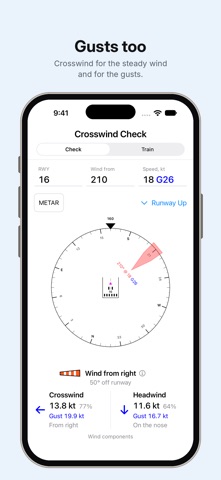
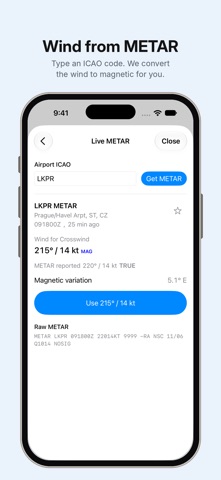
Know what the wind is doing across the runway. Crosswind Check gives pilots a clear, visual way to calculate crosswind, headwind and tailwind components and a practical way to get better at estimating them without a calculator. Enter the runway and wind, or use the latest available METAR for an airport. Crosswind Check shows the resulting components and visualizes where the wind is coming from relative to the runway. CHECK WIND COMPONENTS Enter a runway, wind direction and wind speed to instantly see: • Crosswind component and direction • Headwind or tailwind component • Sustained and gust components • Wind component percentages • Wind angle relative to the runway Switch between North Up and Runway Up to view the same conditions from two useful perspectives. USE LIVE METAR WIND Enter an airport ICAO code to retrieve its latest available METAR. Crosswind Check shows the reported wind and, where supported, converts true wind direction to magnetic for use with runway headings. Save frequently used airports as Favorites for quick access. Selecting a Favorite makes a fresh METAR request rather than reusing a stored weather result. TRAIN YOUR CROSSWIND ESTIMATE Knowing the exact answer is useful. Being able to estimate it is even better. Train mode gives you runway and wind scenarios to work through mentally. Estimate the crosswind range, determine whether you have a headwind or tailwind, and choose the appropriate control input. Reveal the answer to compare your reasoning with the calculated result and see a simple rule-of-thumb explanation. BUILT FOR PILOTS Crosswind Check is deliberately focused. No account. No setup. No advertising. Just a clear tool for understanding wind relative to a runway. Designed for iPhone and iPad. IMPORTANT Crosswind Check is a supplementary calculation and training aid. It does not determine whether a flight is safe or whether conditions are within an aircraft's operating limitations. Always verify weather information, runway data and applicable aircraft limitations using appropriate authoritative sources before flight.