HingeTime
By Mitch Furrier
- Category Utilities
- Release Date 2026-11-16
- Current Version 1.0
- File Size 7.96 MB
- Links Google Play
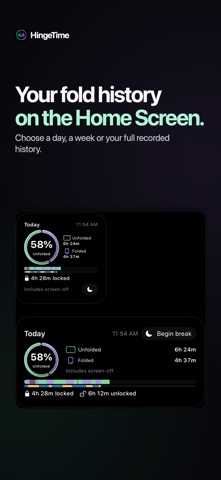
You can read on your Duo while it’s folded. You can also leave it open on the charger. HingeTime helps you see what happens in your day and when. It puts recorded folded and unfolded time alongside the stretches when your phone was locked or unlocked to help you understand how you use your phone on a daily basis. Open Overview to see time in each position. Mint marks unfolded time and purple marks folded time. The second band shows observed locks in amber and unlocked stretches in blue. Tap Lock details to see how much of each fell within folded or unfolded time. If a lock boundary is missing, the breakdown shows that time as unknown. Look back over a day, a week, or your full recorded history. Turn on the Hinge checks layer to see individual readings. If you choose to log app openings with Shortcuts, you can also see which apps you opened in each position. Check your folded and unfolded totals on the Lock Screen. Choose today, the last seven days, or all-time, then tap the widget to open Lock details for that period. Small and medium Home Screen widgets show your totals too. When you put the phone away, you can start a StandBy break from the app or a Home Screen widget and end it when you return. HingeTime measures time in a position, including idle and screen-off time by default. You can exclude observed locks from your totals. Your history is stored on your device. No account is required. Automatic fold tracking uses the Opened and Closed automations in Shortcuts on a compatible iPhone Duo. HingeTime includes both shortcuts and walks you through enabling them. The app requires iOS or iPadOS 27 or later. On devices without hinge triggers, positions can be recorded manually.